> For the complete documentation index, see [llms.txt](https://ccie-sp.gitbook.io/ccie-spv5.1-labs/llms.txt). Markdown versions of documentation pages are available by appending `.md` to page URLs; this page is available as [Markdown](https://ccie-sp.gitbook.io/ccie-spv5.1-labs/labs/mpls-te/reoptimization-timer.md).
# Reoptimization timer
Load **mpls.te.base.config.with.ospf.cfg**
```
#IOS-XE
config replace flash:mpls.te.base.config.with.ospf.cfg
#IOS-XR
configure
load bootflash:mpls.te.base.config.with.ospf.cfg
commit replace
y
```
* Configure bi-directional TE tunnels between CSR8 and XR11, and between CSR8 and CSR5.
* Simply use a dynamic path option.
* Configure R8, R5, and XR11 to reoptimize all tunnels every 1 minute, and whenever a linkup event happens.
* Configure the R8-XR11 tunnels to never reoptimize.
## Answer
```
#R8
mpls traffic-eng reoptimize timers frequency 60
mpls traffic-eng reoptimize events link-up
!
int tun11
description TO_XR11
ip unn lo0
tunnel dest 11.11.11.11
tunnel mode mpls traffic-eng
tunnel mpls traffic-eng path-option 1 dynamic lockdown
!
int tun5
description TO_R5
ip unn lo0
tunnel dest 5.5.5.5
tunnel mode mpls traffic-eng
tunnel mpls traffic-eng path-option 1 dynamic
#R5
mpls traffic-eng reoptimize timers frequency 60
mpls traffic-eng reoptimize events link-up
!
int tun5
description TO_R8
ip unn lo0
tunnel dest 8.8.8.8
tunnel mode mpls traffic-eng
tunnel mpls traffic-eng path-option 1 dynamic
#XR11
mpls traffic-eng
reoptimize 60
reoptimize events link-up
exit
!
int tunnel-te8
description TO_R8
ip unn lo0
dest 8.8.8.8
path-option 1 dynamic lockdown
```
## Explanation
MPLS traffic-eng tunnels are re-calculated using CSPF at the reoptimization interval, or upon a link-up event (if configured). The default reoptimization interval on IOS-XE and IOS-XR is 60 minutes. To change this interval, we can use the following commands:
```
#IOS-XE
mpls traffic-eng reoptimize timers frequency sec
#IOS-XR
mpls traffic-eng
reoptimize sec
```
We can also simply execute reoptimization from the CLI in exec mode on both platforms:
```
#IOS-XE
mpls traffic-eng reoptimize [Tunnel # [path-option #]]
#IOS-XR
mpls traffic-eng reoptimize all|tunnel#
```
Finally, we can configure the router to run CSPF upon a linkup event to reoptimize all tunnels immediately:
```
#IOS-XE
mpls traffic-eng reoptimize events link-up
#IOS-XR
mpls traffic-eng
reoptimize events link-up
```
## Verification
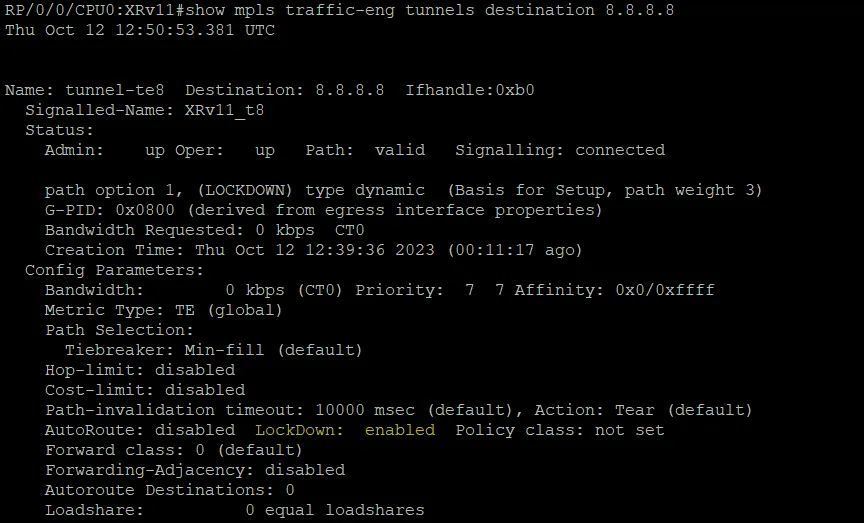
On R8, we can verify that the tunnel to XR11 has **lockdown** enabled on the path-option. This means that the path-option should never be re-optimized. This is a way to completely prevent reoptimization for this particular path-option.
We can see this on XR11 as well:
On R8, we can run **debug mpls traffic-eng tunnels reoptimize detail** to watch reoptimization events. We’ll see that every one minute, the “should\_reopt” value is TRUE for Tun5. Additionally, only tun5’s path-option 1 seems to be activated for reoptimization. We never see Tun11 show “should\_reopt: TRUE”. This appears to be due to the **lockdown** command on the XR11 tunnel path-option.
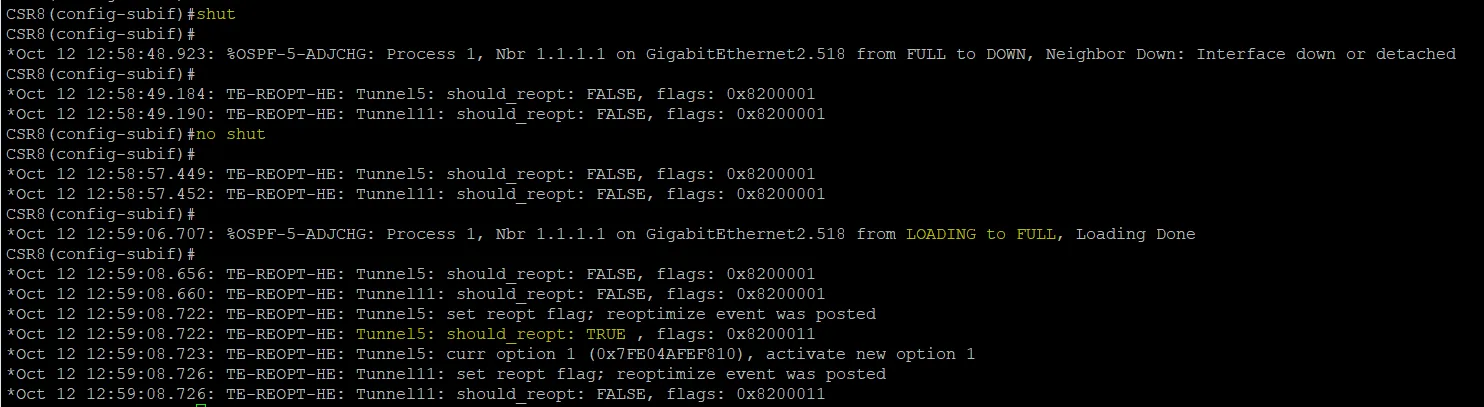
If we flap a link on R8, this should also cause immediate reoptimization upon the link-up event. We’ll increase the optimization timer to make sure the reoptimization happens due to the event, and not the periodic timer.
```
#R8
mpls traffic-eng reoptimize timers frequency 100000
```
Before we make any changes, notice that every 30 seconds the router appears to run a check for whether reoptimization should occur. Every 30 seconds it is always “FALSE” now, because the reoptimization timer is so high.
Next we’ll flap a link on R8. Watch how reoptimization is triggered by the IGP adjacency coming up. Interestingly, the reoptimization process seems triggered at link-down, link-up, and IGP-up. But only IGP-up seems to actually cause reoptimization. Perhaps “link-up” means that link is up from the TED perspective, which only occurs once IGP is up.
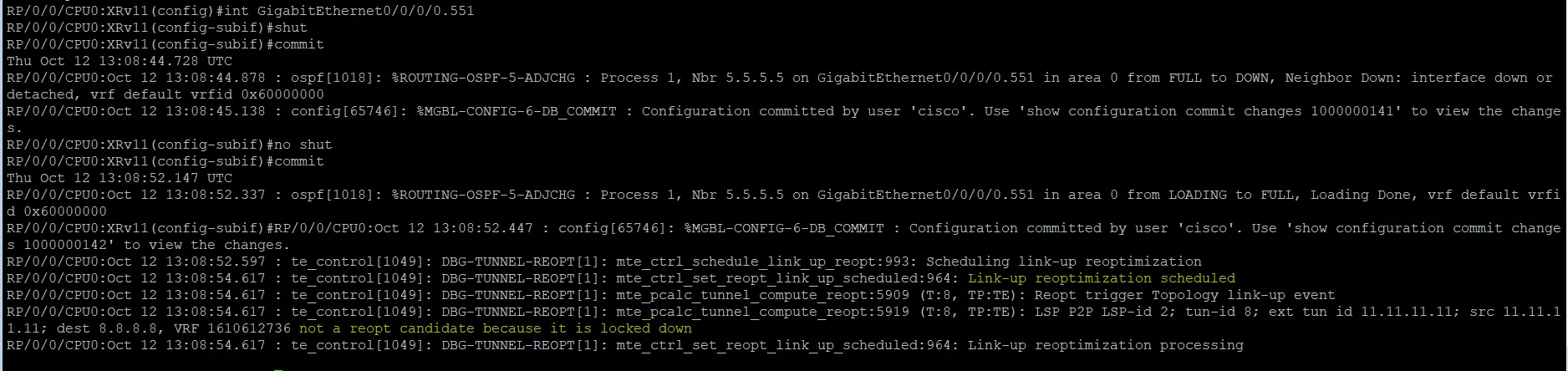
We can use the same debug command on IOS-XR: **debug mpls traffic-eng tunnel reoptimization**. We see that reoptimization is running every 60 seconds.
If we flap a link on XR11, we should see reoptimization kick in due to the link-up event. This gives us much better output than on IOS-XE. We can also clearly see that the tunnel to R8 is not a reopt candidate because the path-option is locked down: